4 March 2025
Locking down Azure App Service with Private Endpoints
Private Endpoint takes your Web App off the public Internet and routes traffic through your virtual network on the Microsoft backbone. Here's the pattern we use, and the trade-offs to know about.
- Azure
- Networking
- Security
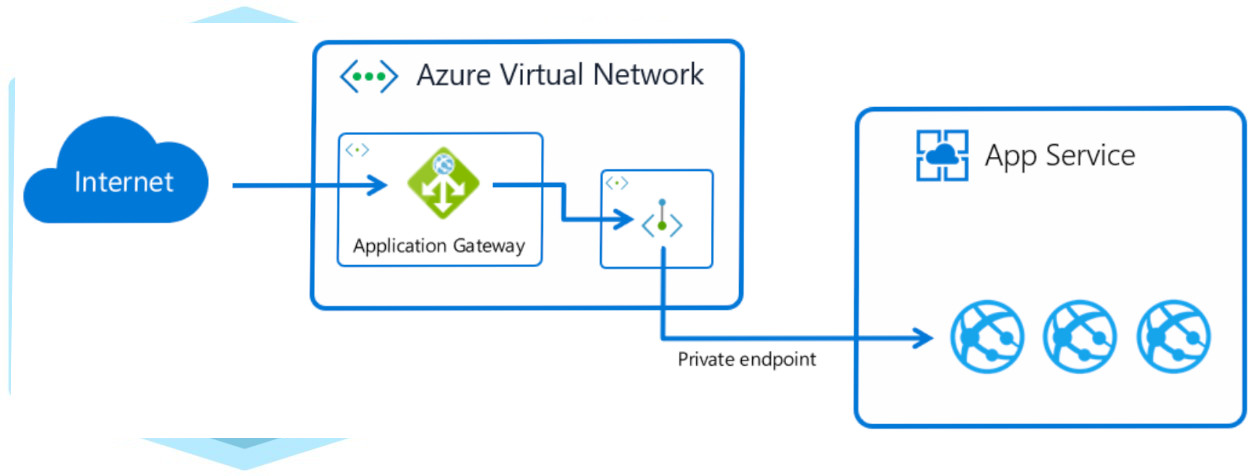
You can use Private Endpoint for your Azure Web App to allow clients located in your private network to securely access the app over Private Link. The Private Endpoint uses an IP address from your Azure virtual network address space. Network traffic between a client on your private network and the Web App traverses the virtual network and a Private Link on the Microsoft backbone network, eliminating exposure from the public Internet.
The pattern
A typical secure App Service deployment looks like this:
- VNet + subnet for the Private Endpoint (delegated to
Microsoft.Web/sites). - Private DNS zone (
privatelink.azurewebsites.net) linked to the VNet so the App Service hostname resolves to the private IP. - App Service access restrictions that disable public ingress.
- VNet integration on the outbound side, so the app can reach backend dependencies (databases, key vault, storage) over their own private endpoints.
The end state: the app is reachable only from your VNet, your peered networks, or via an ExpressRoute / VPN gateway. The public hostname stops resolving externally — anyone hitting it gets a TCP reset.
Things to know
- DNS is the most common failure point. If the private DNS zone isn’t linked to the VNet, clients resolve the public IP and hit the access restrictions.
- Inbound and outbound are separate. Private Endpoint handles inbound traffic. Outbound to other private resources needs VNet integration, which uses a different subnet.
- Deployment slots each get their own private endpoint — don’t forget to plan IPs.
- Cost: each Private Endpoint has an hourly charge plus data processing. Budget for it.
How we deploy this
We codify all of it in Bicep modules: VNet, DNS, the App Service plan, the app, and the private endpoint. One azd up (or pipeline run) lands the whole secure topology, ready for your application code to deploy on top.